SAP ECC and Salesforce CRM Integration Automation
SAP ECC Salesforce integration connects sales activity in Salesforce with the SAP ECC records that control pricing, order processing, delivery, billing and account governance. Customer accounts, contacts, quotes, orders, invoices, credit details, and payment status can move between both systems with the right business context, so sales, finance, and service teams work from the same records.


















Why Choose APPSeCONNECT for SAP ECC and Salesforce CRM Integration
SAP ECC and Salesforce CRM work together through controlled integration workflows. The integration keeps Salesforce activity connected to SAP ECC records, so sales and account teams can rely on ERP-backed customer, pricing, order, delivery, and invoice information without repeated manual follow-ups.

Keep Customer Records Aligned Across SAP ECC and Salesforce
Account, contact, address, billing, and shipping details can move between Salesforce CRM and SAP ECC with mapped rules, so teams work from cleaner records instead of recreating accounts differently in each system.

Build Quotes With ERP-Backed Pricing Context
Salesforce quotes can use SAP ECC material pricing, discount rules, currency values, and tax logic where required, helping sales teams prepare quotes with accurate ERP context before they commit.

Give Sales Teams Clear SAP ECC Order Visibility
SAP ECC sales order, delivery, and billing details can be made visible in Salesforce CRM, so sales and account teams follow order progress without asking operations for every update.

Keep Invoice and Payment Visibility Closer to Account Teams
Billing, invoice, due date, open balance, and payment status details can move from SAP ECC into Salesforce, so account teams answer customer questions with more context.

Help Service Teams Respond With ERP Context
Salesforce cases can be supported with SAP ECC order, delivery, invoice, product, and customer information, so service teams understand the record behind an issue without switching systems.

Bring Credit Context Into Salesforce Decisions
Credit limits, payment terms, overdue balances, and account block indicators can be shared from SAP ECC to Salesforce CRM where business policy allows, giving sales teams finance visibility before new commitments are made.
Standard Features Covered in Our SAP ECC and Salesforce CRM Integration Template
APPSeCONNECT supports SAP ECC and Salesforce CRM integration across customer, sales, and order workflows, with billing and product processes included. The setup can follow your SAP ECC configuration and Salesforce CRM processes, and it can support customer hierarchy, sales organization data, pricing rules, credit policy, and reporting fields based on your project scope.
Salesforce Accounts → SAP ECC Customers: New or updated Salesforce accounts can create or update SAP ECC customer records, including address, tax, sales area, contact, and account reference details. SAP ECC Customers → Salesforce Accounts: Customer changes from SAP ECC can refresh Salesforce account records, so CRM users work with current ERP-backed customer information. Salesforce Contacts → SAP ECC Contact Persons: Salesforce contacts can sync with SAP ECC contact person records, mapping email, phone, role, department, and account relationship fields. SAP ECC Partner Functions → Salesforce Account Relationships: Sold-to, ship-to, bill-to, and payer details from SAP ECC can be reflected in Salesforce, giving sales teams a clearer view of the customer structure.
Salesforce Opportunities → SAP ECC Sales Context: Opportunity details from Salesforce can be shared with SAP ECC where early sales visibility is needed, including account, expected value, sales stage, and owner details. Salesforce Quotes → SAP ECC Quotations: Salesforce quotes can be mapped into SAP ECC quotation records, moving product lines, quantities, pricing, discounts, validity dates, and customer references with the quote. SAP ECC Pricing → Salesforce Quotes: SAP ECC pricing rules can support Salesforce quote preparation, mapping material price, customer price, discount, tax, and currency values where required. Approved Salesforce Quotes → SAP ECC Order Flow: Approved quotes from Salesforce can move toward SAP ECC quotation or sales order processing, reducing re-entry when a quote becomes ready for ERP handling.
SAP ECC Sales Orders → Salesforce: Sales order details from SAP ECC can be made visible in Salesforce, including order number, line details, quantities, requested dates, and status for customer follow-up. SAP ECC Delivery Updates → Salesforce: Delivery information from SAP ECC can update Salesforce records, sharing delivery number, dispatch status, shipment progress, and tracking references. SAP ECC Invoices → Salesforce: Invoice records from SAP ECC can sync to Salesforce, showing invoice number, amount, due date, payment status, and open balance to account teams. SAP ECC Credit Details → Salesforce: Credit limit, payment terms, account block status, and overdue balance indicators can be shared with Salesforce users where business policy allows.
SAP ECC Materials → Salesforce Products: Material master data from SAP ECC can update Salesforce product records, mapping material number, description, unit of measure, product group, and active status. Salesforce Product Selection → SAP ECC Material Mapping: Products selected in Salesforce quotes can be matched with SAP ECC material numbers, reducing errors when quotes move into ERP workflows. SAP ECC Sales Area Data → Salesforce Sales Controls: Sales organization, distribution channel, division, and customer-specific sales rules can support Salesforce activity where needed. Tax and Currency Mapping: Tax categories, currency values, and regional settings can be mapped between both systems, so quote, order, and invoice data move with fewer corrections.
Popular SAP ECC and Salesforce CRM Integrations
SAP ECC and Salesforce CRM integration often becomes part of a larger customer and revenue operations stack. Businesses can connect CPQ tools, service platforms, eCommerce systems, billing applications, data warehouses, reporting tools, and approved custom applications around SAP ECC and Salesforce workflows, with SAP ECC remaining the ERP system of record.
Popular SAP ECC Integrations
Connect SAP ECC with other business applications.



Looking for a Specific Integration?
Popular Salesforce Integrations
Connect Salesforce with other business applications.



Looking for a Specific Integration?
Download the SAP ECC and Salesforce CRM Integration Brochure
Use the brochure to plan how SAP ECC and Salesforce CRM can exchange customer, sales, quote, order, delivery, invoice, payment, and product records. It helps teams decide which system should own each process and how the integration should be rolled out.
Inside you’ll find
- Integration Architecture: How SAP ECC and Salesforce CRM can connect customer records, contacts, quotes, orders, invoices, delivery updates, credit details, and product data.
- Flow Planning: The source and target direction for CRM-to-ERP and ERP-to-CRM workflows.
- Rollout Approach: Start with customer and contact sync, then extend into quotes, sales orders, delivery visibility, invoices, credit data, and product records.
- Testing Checklist: Validate sample accounts, contacts, materials, quotes, sales orders, partner functions, invoices, credit fields, and retry scenarios before launch.
- Operational Readiness: Prepare teams to monitor runs, review logs, inspect failed records, correct mapping issues, and retry transactions after go-live.
Use Cases
The SAP ECC and Salesforce CRM integration supports businesses that need customer-facing teams and ERP teams to work from connected records. It is useful for manufacturers, distributors, B2B sellers, service organizations, and companies using SAP ECC as the ERP system and Salesforce as the customer relationship platform.
Scenario: Sales teams quote with SAP ECC customer and product context
Sales teams using Salesforce need reliable SAP ECC data before they prepare quotes or commit to customer expectations. Customer status, material data, pricing rules, and tax logic can all influence what the team can sell and how the quote should be built.
- Salesforce accounts can stay aligned with SAP ECC customer records.
- SAP ECC product and material data can support Salesforce quote lines.
- Pricing, discount, tax, and currency details can be mapped into the quote process.
- Approved quotes can move toward SAP ECC quotation or sales order workflows.
What this integration handles
Synced
Customer and contact data
Mapped
Material and price details
Checked
Tax and sales rules
Prepared
Quote-to-order handoff
Supports field sales, inside sales, account managers, and quote-driven B2B teams.
Scenario: Salesforce users see invoice and payment context without asking finance
Finance activity often stays in SAP ECC, while customer follow-up happens in Salesforce. Integration helps account teams view billing context before they discuss renewals, payment issues, or new orders.
- SAP ECC invoices can be visible in Salesforce.
- Payment status and due dates can support account follow-up.
- Credit limits, payment terms, and account blocks can be shared where policy allows.
- Open balances can help sales teams understand finance risk before moving forward.
What this integration handles
Visible
Invoice and due date data
Shared
Payment and credit context
Flagged
Account block indicators
Reviewed
Billing follow-up details
Supports finance, collections, sales management, and account teams that need cleaner billing visibility.
Scenario: Service teams handle cases with ERP transaction context
A service team working in Salesforce may need SAP ECC order, delivery, invoice, or product details to answer a customer question. Integration reduces the time spent switching systems or waiting for operational updates.
- SAP ECC sales order status can be shown in Salesforce.
- Delivery updates can help service teams answer shipment questions.
- Invoice references can support billing-related cases.
- Customer and contact data can stay aligned across service and ERP teams.
What this integration handles
Shown
Order status details
Updated
Delivery information
Linked
Invoice references
Aligned
Customer and contact records
Supports customer service, account care, support desks, and post-sale service teams.
Scenario: Pipeline activity stays connected with ERP outcomes
Revenue teams need to see more than pipeline movement inside Salesforce. They also need to understand which opportunities became SAP ECC orders, which orders moved forward, and which invoices were issued.
- Salesforce opportunities can connect with ERP customer and order records.
- SAP ECC sales orders can update Salesforce with execution status.
- Invoice and payment information can improve revenue visibility.
- Logs and snapshots can help operations teams review sync results.
What this integration handles
Connected
Pipeline and ERP records
Updated
Sales order status
Tracked
Invoice and payment signals
Audited
Sync logs and snapshots
Supports revenue operations, sales leadership, finance operations, and reporting teams.
How Does the Workflow Run End-to-End
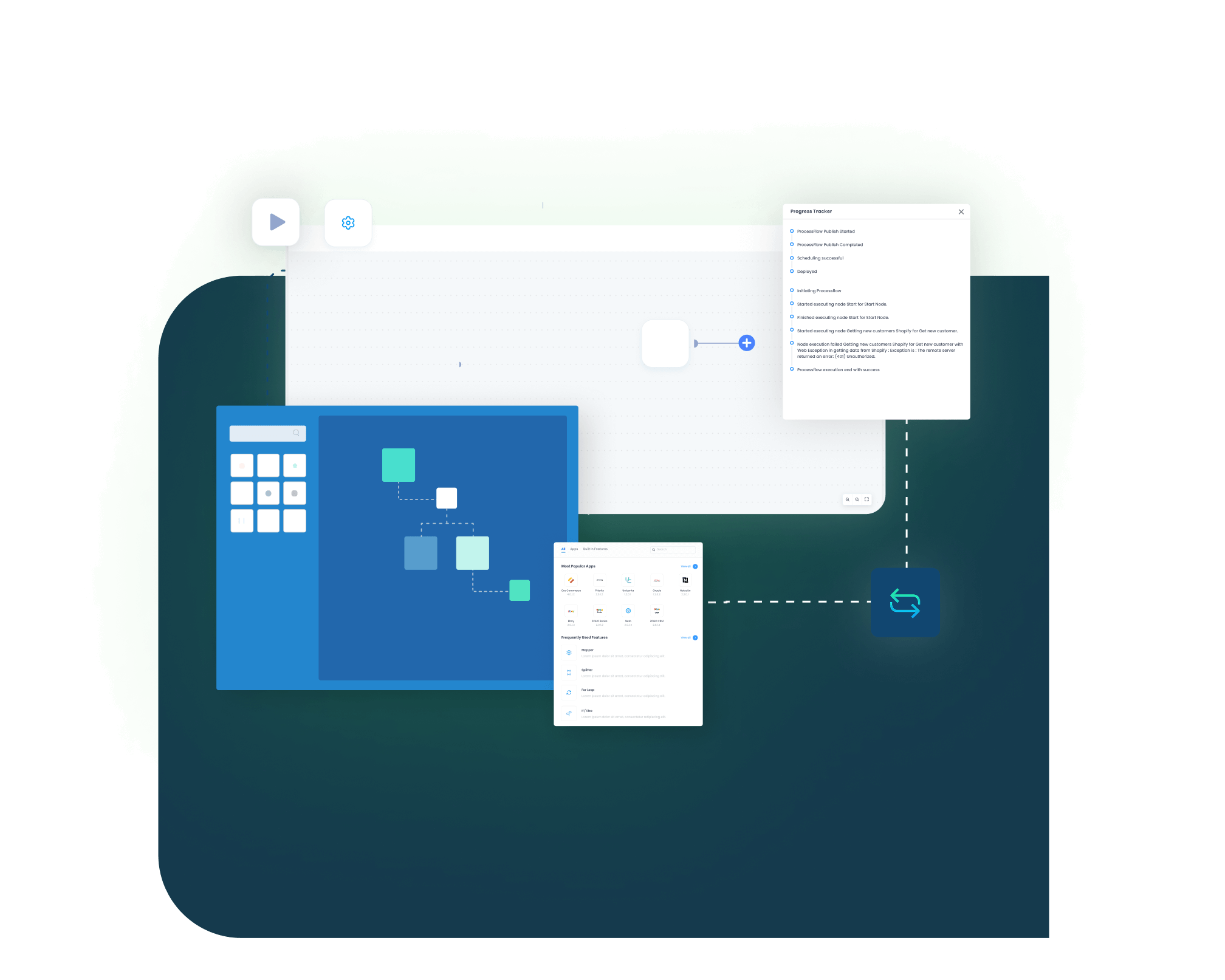
Our SAP ECC and Salesforce CRM integration runs through ProcessFlows. Each ProcessFlow defines where the record starts, how the source schema is read, how fields are mapped, which business checks are applied, how the target system responds, and how teams review the transaction afterward.
Trigger and Source Connection
The flow can begin through a schedule, manual run, webhook where supported, or configured sync. The source can be SAP ECC or Salesforce CRM depending on the process.
Data Extraction and Schema Reading
The workflow reads the selected source entity and its schema. This may be an account, contact, opportunity, quote, customer, material, sales order, delivery, invoice, or credit-related record.
Transformation and Field Mapping
Source data is converted into the target format. Customer number, account ID, contact ID, material number, sales area, currency, tax, payment term, quote line, and order status fields can be mapped.
Validation and Business Rule Execution
The record is checked before it posts. The flow can validate customer matching, duplicate rules, material codes, pricing conditions, sales organization, tax groups, credit status, and required fields.
Target Push and Response Handling
The prepared record is sent to SAP ECC or Salesforce CRM. The response is captured with the success state, failure reason, system message, sync status, and transaction result.
Monitoring, Retry and Audit Logging
Logs, snapshots, node status, transaction details, and retry controls help teams review issues and rerun records after correction.
How appse ai Helps Streamline SAP ECC and Salesforce CRM Integration
After SAP ECC and Salesforce CRM are connected, teams still manage failed records, mapping changes, process delays, and repeated checks. appse ai can add AI-assisted support around workflow design, exception review, process signals, and workflow optimization while keeping SAP ECC and Salesforce CRM controls in place.
- Workflow Design: Help teams build or adjust automation flows with no-code tools and AI-assisted guidance.
- Issue Detection: Help teams identify failed records, failed workflow runs, and repeated exception patterns across account, quote, order, invoice, and product flows.
- Exception Review: Review missing fields, mapping gaps, validation errors, and system responses with clearer transaction context.
- Decision Support:: Help apply routing and conditional checks when Salesforce activity depends on SAP ECC pricing, credit, tax, or sales organization rules.
- Process Signals: Help teams track where records slow down, fail often, or create extra follow-up work for sales, finance, or service teams.
- API Orchestration: Extend SAP ECC and Salesforce CRM workflows to CPQ, service, finance, reporting, and approved custom systems from the same automation layer.
- Workflow Optimization: Help teams identify where the integration may need changes as account volume, quote complexity, sales regions, or order activity grows.

Ready to Launch Your SAP ECC and Salesforce CRM Integration Today?
SAP ECC and Salesforce CRM should not leave teams working from different versions of customer, quote, order, delivery, and invoice data. APPSeCONNECT helps connect Salesforce activity with SAP ECC records through structured workflows, so teams can reduce manual checks and improve visibility across the customer lifecycle.

Frequently Asked Questions
SAP ECC and Salesforce CRM integration connects ERP and CRM records so customer, sales, and finance data can move between both systems. It can include accounts, contacts, quotes, orders, delivery updates, invoices, credit details, and product data, with SAP ECC staying the system of record.
Businesses integrate SAP ECC with Salesforce to reduce duplicate customer records, quote errors, order status gaps, and invoice visibility delays. It helps Salesforce users work with SAP ECC context without asking finance or operations teams for every update.
APPSeCONNECT connects SAP ECC and Salesforce through configured ProcessFlows. Each flow defines the source, target, entity, field mapping, validation rules, retry behavior, and monitoring path, so records move with the right business rules applied.
The integration can sync accounts, contacts, customers, partner functions, products, materials, opportunities, quotes, sales orders, delivery status, invoices, payment status, credit details, and tax-related data based on the configured process.
The integration can run in one direction or both directions depending on the process. Customer and quote data often flow from Salesforce to SAP ECC, while order status, delivery, invoice, credit, and payment details often flow from SAP ECC back to Salesforce.
Direct API integration and SAP web services can move data programmatically, but the connection logic, mapping, and monitoring are maintained in custom code. A third-party iPaaS like APPSeCONNECT adds prebuilt connectors, a visual ProcessFlow designer, field mapping, validation, monitoring, and retry in one governed layer. The right choice depends on how many systems you connect and how much custom code you want to maintain.
This page focuses on SAP ECC and Salesforce CRM. APPSeCONNECT also supports SAP S/4HANA and SAP Business One with Salesforce. If your business runs S/4HANA or is planning a migration, review the related SAP integration options separately so the connection method matches your ERP version.
SAP ECC pricing rules, material prices, discounts, taxes, and currency values can support Salesforce quote preparation where the integration is configured for it. This helps quote-driven B2B teams build quotes with ERP-backed pricing before a quote moves toward SAP ECC order processing.
Failed records can be reviewed through logs, snapshots, node status, and transaction details in the Sync Info dashboard. Auto-retry handles transient failures, and teams can correct missing fields, mapping issues, duplicate conflicts, or validation errors before resyncing the affected record.
Start by selecting the records that create the most manual work. Common starting points include account sync, contact sync, quote sync, SAP ECC order visibility, invoice visibility, product sync, and credit detail updates. APPSeCONNECT can then help map, configure, test, monitor, and scale the integration.
Order status, delivery, invoice, credit and payment details often flow from SAP ECC to Salesforce, while customer and quote data often flow from Salesforce to SAP ECC.
Yes. Invoices, payment status and credit details can sync from SAP ECC to Salesforce, so sales and service teams work from the same records.
Companies automating their business through APPSeCONNECT







Customer Success Stories

Piovan Group North America
Piovan Group designs and manufactures automation systems used to store, convey, and process polymers, powders, and food ingredients.
Read Case Study →
Nextron
Nextron is a Nordic manufacturing and distribution business with sales teams working from one Salesforce org, and local finance and operations running in SAP Business One.
Read Case Study →
Kyocera case study
Kyocera International Inc. is a leading manufacturer of high-quality ceramic cutlery, kitchen tools, and cookware.
Read Case Study →Related Resources
Articles and Guides to Help You With Your Integration and Automation Journey