



As more brands move to Shopify, they’re bringing with them the complexities of large catalogues, technical products and merchandising rules tailored to specific buyers and distributors. Every day your Shopify store runs without seamless ERP integration, you’re bleeding money, whether you see it or not.
Companies face:
- Lost sales due to out-of-stock items.
- Delayed order processing is impacting customer loyalty.
- Revenue leaks from manual entry errors.
A stylish and persuasive website is only helpful if your customers can find your products easily.
Shopify’s catalog management can help you organize this type of product information through bi-directional ERP sync. Unifying ecommerce and ERP creates a seamless buying experience, where any change made in the ERP will directly reflect on your Shopify website, and vice versa.
The High Cost of Inefficient Product Catalog Syncing
As a Shopify business grows, managing product data across multiple systems like an ERP or other sales channels becomes exponentially more complex.
Without a robust integration strategy, data becomes siloed, leading to failed or delayed updates that directly impact revenue and customer trust. Imagine your Shopify store shows something as an item “in stock” when your warehouse is empty; this is the reality of inefficient syncing.
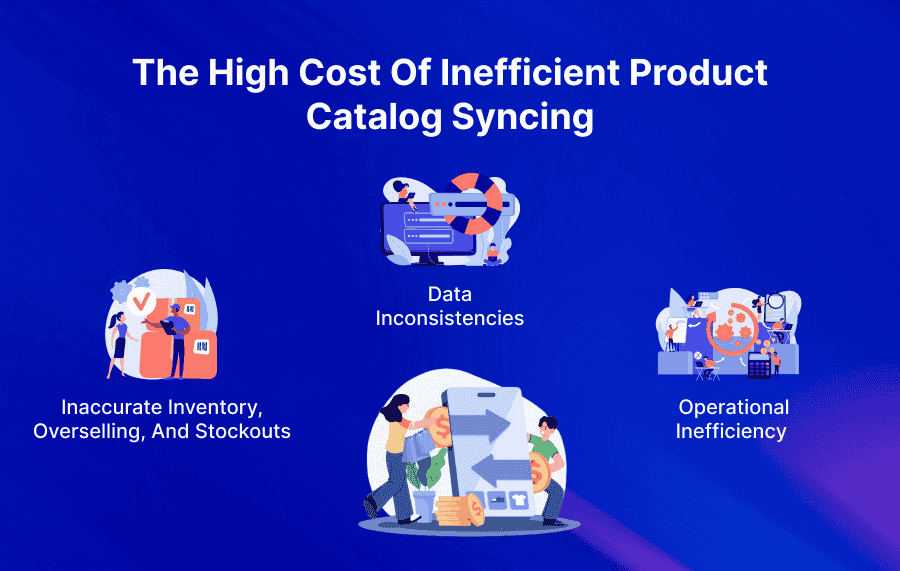
1. Inaccurate Inventory, Overselling, and Stockouts
Delays in synchronizing inventory levels between your ERP and your Shopify storefront are a primary cause of overselling.
When a popular item sells out but the product isn’t updated for hours, you continue to accept orders you can’t fulfil. The consequences are severe: frustrated customers, canceled orders, and negative reviews leave lasting damage to your brand’s reputation.
Integrating your Shopify store with your ERP through APPSeCONNECT replaces these manual gaps with accurate, real-time data, helping you consistently hit the inventory sweet spot and avoid costly stockouts or overselling.
2. Data inconsistencies
According to the Aberdeen Group, manual inventory processes lead to an average inventory record inaccuracy of 8–14%. Staff are forced to manually check and correct data discrepancies between Shopify and backend systems.
Automated workflows keep data synchronized across all connected systems in real time, significantly reducing errors and discrepancies.
For instance, with APPSeCONNECT’s ERP Shopify integration, any change made to the platforms, whether related to inventory, customer information or product listings, is updated simultaneously.
This ensures complete consistency, eliminating mismatched or outdated data.
3. Operational inefficiency
Companies run better when they know what products they have in stock and where those products are located. In fact, the entire supply chain benefits from a shorter sales cycle with minimal to no manual tasks that can disrupt production, distribution, and fulfillment.
As a result, the manufacturer experienced faster order processing, improved operational efficiency, and enhanced customer satisfaction, eliminating manual, resource-intensive workflows.
Understanding the ERP-Shopify data relationship
When Shopify is connected to an ERP system (like SAP B1, Microsoft Dynamics, or NetSuite), the two platforms continuously exchange key business data. This ensures that your online store and back-office operations work in harmony without manual intervention.
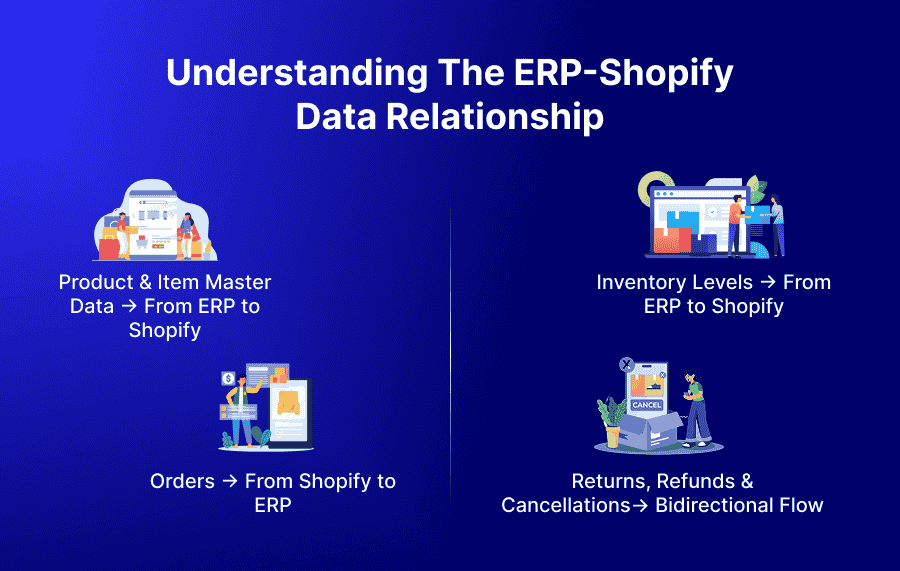
1. Product & Item Master Data → From ERP to Shopify
The ERP system acts as the central authority for all product-related information. It stores every detail required to define an item, whether it’s a simple SKU or a complex variant with multiple attributes.
Once products are created or updated in the ERP, the integration pushes the information to Shopify automatically:
- New items are published on Shopify as product listings with all relevant details.
- Updates made in ERP, such as prices, descriptions, or variant additions, are instantly reflected online.
- Discontinued or inactive items in ERP can be automatically unpublished or hidden from the storefront.
2. Inventory Levels → From ERP to Shopify
The ERP acts as the central system where all inventory movements are tracked in real time. Whether stock is coming in through production, purchase receipts, or warehouse transfers, the ERP always maintains the most accurate quantity on hand.
These real-time inventory levels are then synced to Shopify, ensuring customers only see what is actually available for purchase. This prevents overselling and improves customer satisfaction by showing reliable stock information.
- ERP records every inward and outward stock movement instantly, including procurement, returns, sales, and manufacturing updates.
- Inventory changes in the ERP automatically sync to Shopify and update product quantities.
- Customers always see accurate, real-time stock availability on the Shopify storefront.
- Offline or in-store sales update the ERP inventory, which then syncs back to Shopify.
- Newly received warehouse stock is pushed to Shopify immediately, ensuring products appear back in stock online.
3. Orders → From Shopify to ERP
When a customer completes a purchase on Shopify, the order is automatically transferred to the ERP system. This ensures the ERP becomes the central hub for processing, fulfillment, and financial reconciliation.
Once received, the ERP generates a detailed sales order that includes everything needed for accurate downstream operations, product line items, taxes, customer information, shipping method, and payment status. From here, the ERP initiates the fulfillment cycle, covering picking, packing, shipment, and invoice generation.
- Shopify captures sales, including browsing activity, checkout, and payment confirmation.
- ERP processes operations from the moment the order is created.
- ERP manages fulfillment, inventory updates, and all back-office workflows.
- Data flows both ways between Shopify and the ERP.
- Fulfillment updates, shipment details, and inventory changes from ERP sync back to Shopify.
- Customers get real-time order and delivery visibility on Shopify.
4. Returns, Refunds & Cancellations→ Bidirectional Flow
Customers may request returns, cancellations, or refunds directly through Shopify’s storefront or admin panel.
- Shopify captures the return or cancellation request instantly.
- This request is pushed to the ERP, where the actual return workflow is executed.
- The ERP updates:
- Inventory (restocking, damaged goods, return-to-vendor logic)
- Financial documents, such as credit memos, refund invoices, or return orders.
- Once processed, relevant status updates flow back to Shopify so customers see accurate order and refund updates in real time.
While Shopify manages the customer-facing experience, the ERP acts as the authoritative source for all financial and inventory implications.
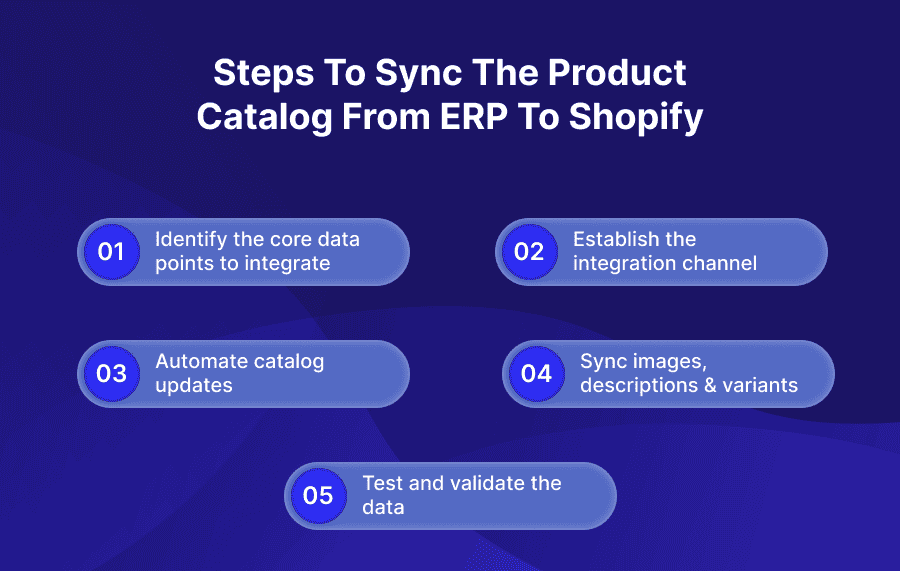
Steps to sync the product catalog from ERP to Shopify
A successful ERP-ecommerce integration starts with clearly defined requirements. Understanding what kind of data flows between systems and in which direction is essential for setting expectations and avoiding future roadblocks.
Step 1: Identify the core data points to integrate
To reduce the typical 3-6 months to go-live cycles of SAP integration, APPSeCONNECT is heavily investing in industry-specific integration templates. Core processes such as product listings, inventory updates, order creation, customer data syncing, and pricing or promotions are already configured.
These will vary based on your business, but there are common must-haves:
- Order data: Covers line items, quantities, pricing, taxes, and shipping details. Any order placed on your storefront is automatically pushed to the ERP for further processing, invoicing, and fulfillment.
- Inventory data: Synchronizes stock levels and warehouse locations so product availability stays accurate and consistent across all channels.
- Customer data: Passes customer profiles, pricing tiers, credit limits, and contact details to the ERP to support personalized experiences and apply business rules correctly.
- Fulfillment information: Updates order status, shipment details, and tracking numbers in real time, ensuring customers and internal teams always have the latest information.
- Returns and refunds: Maintains alignment between systems when processing return requests, issuing refunds, or adjusting inventory.
- Product data: Includes SKUs, descriptions, categories, pricing, and extended attributes such as size, color, and any custom specifications.
For instance, APPSeCONNECT seamlessly integrated WaterTech’s ERP system (SAP Business One) with its e-commerce platforms (Amazon, BigCommerce, Shopify, and others).
This integration automated order synchronization between the platforms and the ERP system, eliminating the need for manual data entry and dramatically reducing errors in order processing.
Step 2: Establish the integration channel
An ERP-Shopify integration connects two systems to foster seamless collaboration and data sharing. The three most common approaches are:
Custom APIs:
Custom APIs allow deep, tailored integration between CRM and ERP, without an intermediary platform.
In isolation, this can seem. However, this approach becomes exponentially complex as your needs grow. Each new integration point will require its own connection, evolving into a ‘spaghetti architecture’ that becomes increasingly difficult to maintain and monitor.
Middleware/ iPaaS Solutions:
iPaaS (Integration Platform as a Service) is a third-party, cloud-based solution that functions in its own environment. It is equally effective for cloud and on-premise ERP deployments.
iPaaS can be quicker and cost-effective to integrate with your systems. These are usually low-code or no-code, meaning they require little technical background to implement. Moreover, they’re ideal for businesses with frequently changing systems and data flow requirements.
Step 3: Map Data Fields Between ERP & Shopify
APPSeCONNECT provides a structured, low-code approach to running Shopify–ERP integrations.
Pre-mapped data objects let teams launch fast, while the visual workflow designer makes it easy to handle exceptions as they come up. And with clear, real-time logs, your team stays confident, even during peak activity.
Step 4: Sync images, descriptions & variants
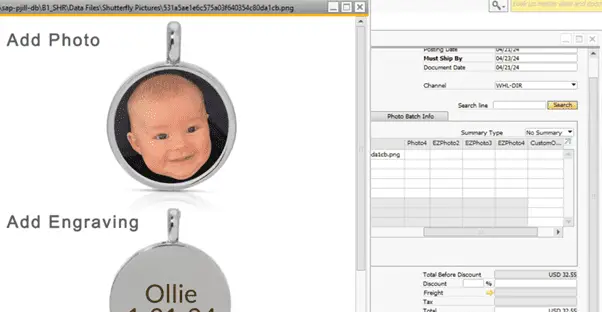
When syncing data between Shopify and ERP, each line item includes a predefined image URL. A cloud function picks up this URL, downloads the image, and saves it to a specific folder on the server.
Your ERP already has a UDF for storing line-item details. During sales order sync, the folder path containing the image is mapped to this UDF for each item.
This ensures accurate product images are always linked to the correct order lines, improving clarity and customer experience.
With APPSeCONNECT, this entire process is automated, Shopify line-item images flow directly into your ERP, keeping both systems consistent and efficient.
Step 5: Test and validate the data
Not every payload comes through cleanly. APPSeCONNECT validates each input, automatically retries temporary failures, and isolates hard errors for later review using full context and idempotency keys.
Operators receive clear, actionable messages, correct the issue, and reprocess only the affected records. Instant alerts via email or chat ensure SAP–Shopify sync issues are resolved quickly, no need for weekend firefighting scripts.
For example, a lifestyle brand can rely on APPSeCONNECT to flag mapping errors, notify the operations team, and let them re-run failed orders directly from the business log with a single click.
Step 6: Monitor & Maintain the Sync
Even the most well-designed real-time or scheduled integrations require ongoing monitoring to ensure data remains accurate, consistent, and complete across systems. Continuous oversight helps teams identify issues early, reduce downtime, and prevent data mismatches that can disrupt operations.
Error Logs & Audit Trails
Error logs record every failed sync attempt, validation error, API mismatch, and transformation failure. These logs help administrators trace exactly where and why an issue occurred, whether it’s incorrect data format, missing field values, or API request failures. Maintaining audit trails also ensures compliance and provides a historical view of all sync activities.
Sync Dashboards & Health Metrics
A dedicated dashboard gives real-time visibility into sync status, throughput, delays, pending jobs, and failures. Centralized views help teams understand integration health at a glance, track usage spikes, and spot anomalies quickly. Modern integration platforms provide alerts, KPIs, and drill-down diagnostics to investigate issues proactively.
Webhook Retry Logic
Webhooks can fail due to network issues, timeout errors, or API throttling. A robust retry logic ensures events aren’t lost. Systems typically follow exponential backoff, a structured approach where retries happen at increasing intervals until the delivery succeeds or a maximum limit is reached. This prevents data gaps and ensures reliability without overwhelming target systems.
API Failure Handling
API failures can occur because of downtime, rate limits, incorrect authentication, or corrupted payloads. Proper failure handling includes:
- Auto-retry mechanisms
- Detailed error messages
- Circuit breaker patterns
- Fallback workflows (e.g., switching to queue storage)
This ensures the sync remains resilient even when one system is temporarily unavailable.
Scheduled Job Monitoring
Batch or scheduled syncs (hourly, nightly, etc.) require monitoring of job success/failure status, duration, and load. Dashboards or schedulers can send alerts when a job takes too long, skips records, or fails mid-execution. Monitoring execution time also helps identify scalability issues as data volume grows.
Exception Handling & Recovery
Unhandled exceptions such as unexpected data structures, missing mandatory fields, or transformation errors should trigger alerts and move affected records into a quarantine queue for manual review. A recovery mechanism ensures faulty entries don’t break pipelines and can be re-processed once corrected. Proper exception handling reduces system downtime and maintains clean, reliable data.
Future of Shopify–ERP Integration in B2B
The next wave of Shopify–ERP integrations will move from simply reporting data to anticipating it. For instance, APPSeCONNECT will report sudden return spikes, unusual stock transfers, or a stalled sync job; the system will highlight the issue with a clear explanation.
APPSeCONNECT truly understood our needs and delivered a seamless integration between SAP and BigCommerce. It empowers bidirectional data exchange between systems to eliminate manual data entry and synchronize everything.
Here’s a real case study on how Eurofer used APPSeConnect to connect Amazon, Magento, and SAP Business One and streamlines its inventory process.
Frequently Asked Questions
Syncing your catalog ensures your Shopify store always reflects up-to-date product data—prices, inventory, descriptions, and variants. This prevents overselling, reduces manual workload, and improves customer trust by showing accurate information at all times.
APPSeCONNECT supports real-time, event-driven, or scheduled syncs. Inventory can update instantly, while product attributes and images can be configured to sync on demand or at regular intervals.
No—your Shopify product pages remain intact. The integration updates specific fields based on rules you configure, such as pricing or inventory. Styling, themes, SEO content, and merchandising choices stay untouched.
Typical deployment is 2–3 weeks with APPSeCONNECT. Custom API integrations usually take 3–6 months and require significant developer time.